Appearance
Set up your event
Event Basics
FIELDS
| Field |
|---|
| Event name |
| Description |
| Location |
| Start Date/Time |
| End Date/Time |
| Timezone |
Security Settings
These can be configured in the Advanced tab.
Visibility
| Name | Description | Notes |
|---|---|---|
| Public | Anyone with the link can access the event | |
| Private | Volunteers will need an invite code | You can generate your invite code when you select this option |
| Organisation-only | Only those with the same organisation as you can see the event |
Max shifts per volunteer
Control the maximum number of shifts a single volunteer can sign up to.
Event Password
You can optionally set an event password to limit access to your event. This is separate to the invite codes for the Private visibility option, so you can have both, just one, or neither.
Shifts
Creating Shifts
If you've used any calendar app on your phone, you can create shifts just like you would create any other calendar events! Simply drag from your desired start time to the end time. 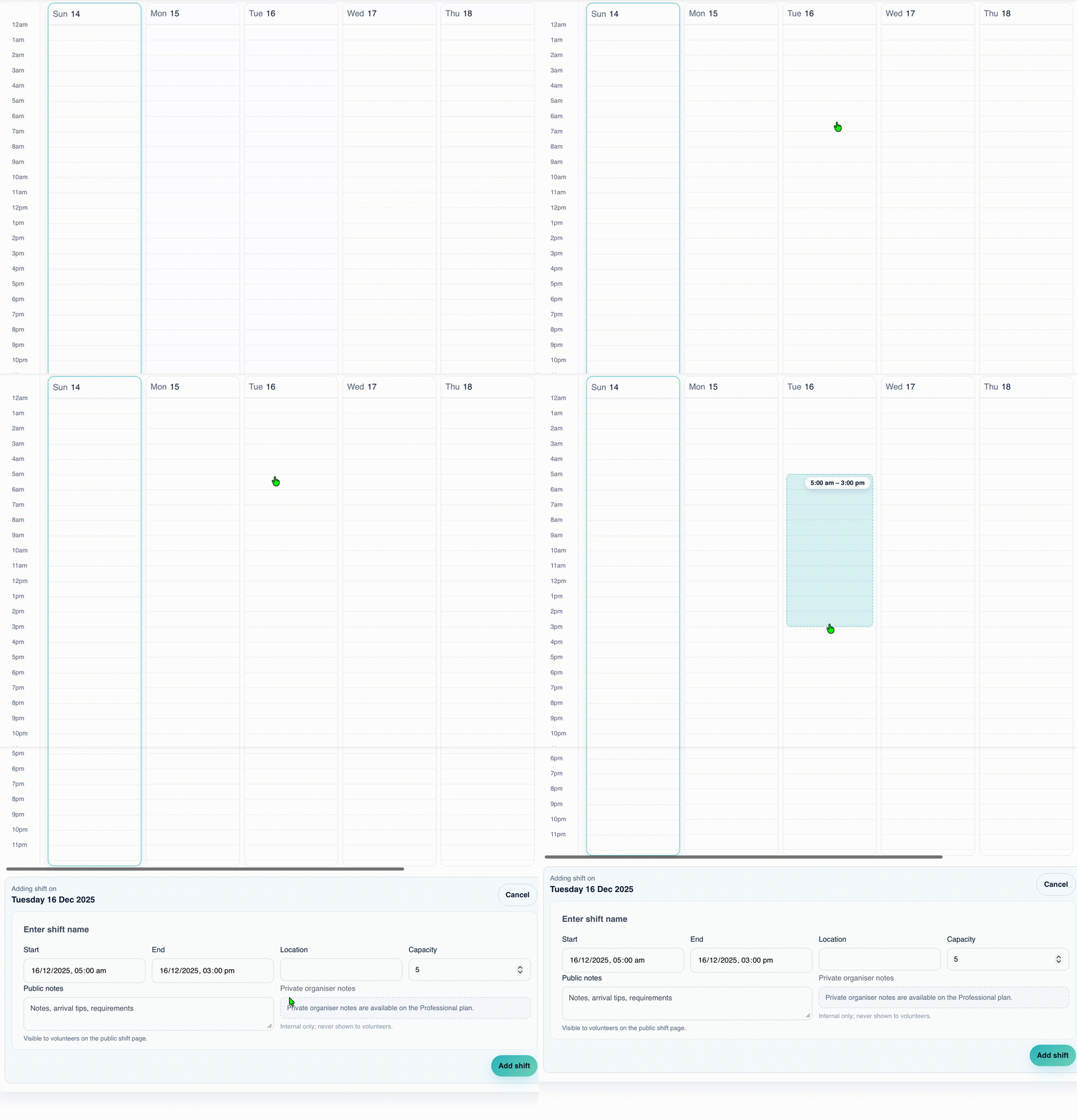
TIP
If you struggle to use the calendar modes, you can switch to the list view, where you can simply add a new shift by specifying the start and end times.
Shift Surveys
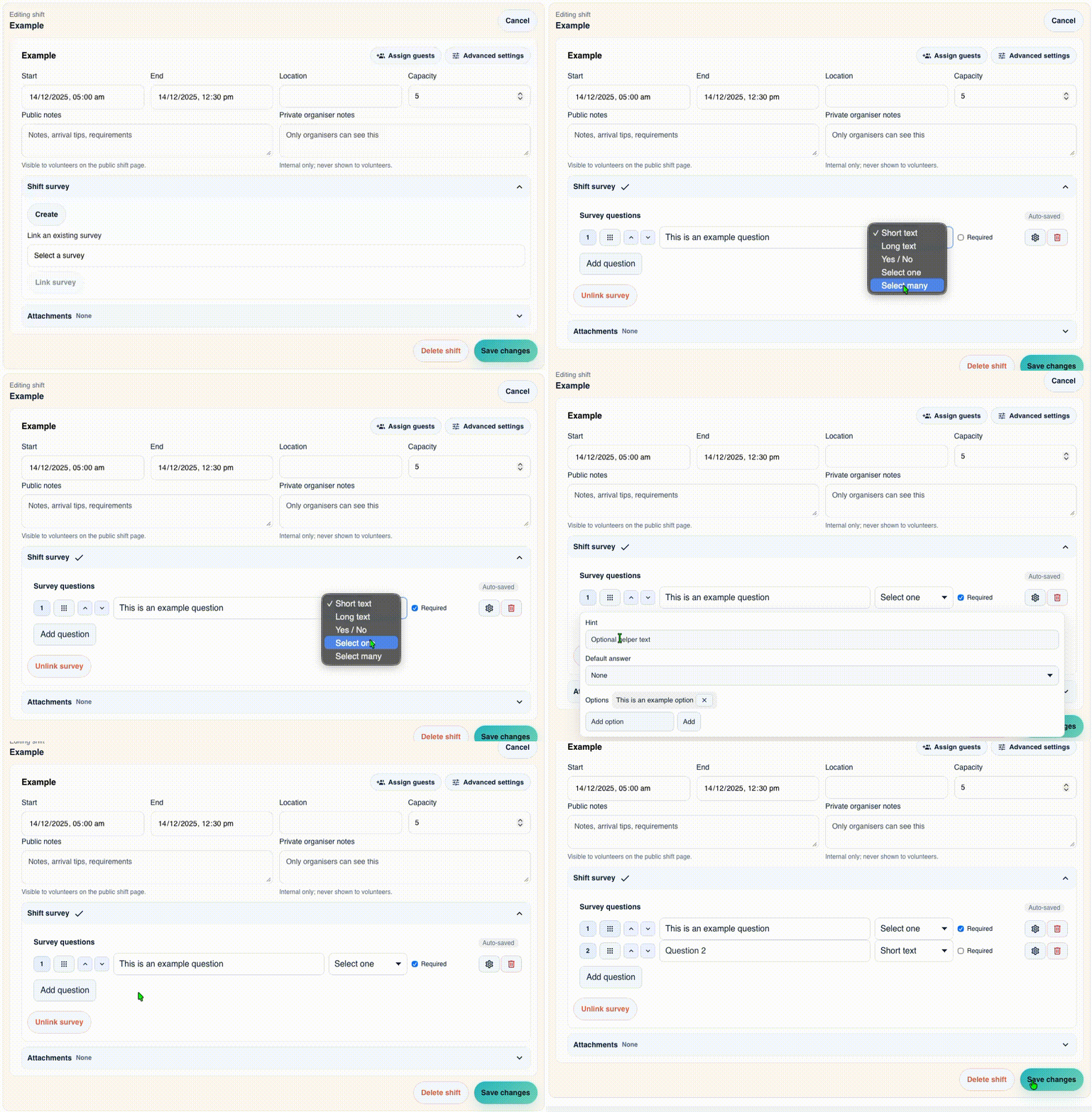
Shift surveys allow you to screen volunteers for a shift. This is very powerful when combined with the Requires approval advanced setting. To create one, go to an existing shift (or click on it if you're in the calendar view), and either link an existing survey or create a new one!
You will see the results in the Registrations tab. See Managing your event for more.
Advanced Shift Settings
Access advanced settings by clicking this button
| Setting | Description | Options |
|---|---|---|
| Waitlist | For when your shifts are full | On / Off |
| Requires Approval | Signups will have to go through an organiser approval step. Signup requests can be seen in the Registrations tab. | On / Off |
| Allow overlapping signups | Turning this on will make the shift "not count" when Signup Zone calculates conflicts. A conflict is when a volunteer signs up to multiple shifts over the same time period. | On / Off |
| Name visibility | Control public visibility & privacy. | Full name, Initials, Anonymous |
| Reminders | Signup Zone can send automatic reminders to your volunteers. Toggle the cadence of reminders from the advanced settings. | Week-before, Day-before, Day-of |
Organisers
Inviting Organisers
- Go to the
Organiserstab while editing your event. - Type in the email adddresses of those you want to be able to edit your event.
- Click
Generate linksand email invitations will automatically be sent!- You can also manually send the links by copying them.
Managing Organisers
You can also remove organisers from this tab as well under Existing organisers.
Attachments
TIP
Attachments a paid feature, to take a look at our paid plans, visit this link.
Branding
TIP
Branding functionality is a paid feature, to take a look at our paid plans, visit this link.
Branding features include: Cover images, Themes, and Custom URLs.
Custom URL
You can set a Custom URL from the Advanced tab.